> For the complete documentation index, see [llms.txt](https://even-financial.gitbook.io/developer-center/llms.txt). Markdown versions of documentation pages are available by appending `.md` to page URLs; this page is available as [Markdown](https://even-financial.gitbook.io/developer-center/marketplace-integrations/partner-pages/banking-deposits-marketplace.md).

# Banking Marketplace

How to get started with a Partner Page integration for Engine's Banking Marketplace.

## Standard Partner Page Integration

### Partner Page URL Syntax & Components

All Partner Pages utilize custom URLs and tracking to ensure all transactions are correctly attributed. To integrate the **Partner Pages** on your website, you would place the following URL on your page in your desired location.

{% hint style="info" %}
**PLEASE NOTE**: Your Engine representative will provide you with your specific partner page URL. Do not try to reproduce from the sample URL outlined below.
{% endhint %}

<pre><code>https://moneylion.com/network/<a data-footnote-ref href="#user-content-fn-1">{channel}</a>/<a data-footnote-ref href="#user-content-fn-1">{zone}</a>/
</code></pre>

* **Channel:** Placeholder to be replaced with precise values in the embed code provided to you.
* **Zone:** Placeholder to be replaced with precise values in the embed code provided to you.

If implementing using an anchor \<a> tag, you may consider having the link open in a new tab with a `target="_blank"` attribute:

{% code overflow="wrap" %}

```html
<a href="https://moneylion.com/network/{channel}/{zone}/" target="_blank">Desired Link Text</a>
```

{% endcode %}

***

## Different Partner Page Experiences

{% hint style="info" %}
Note that the screenshots in this section reflect a Personal Loans Partner Page, not a New Marketplaces Partner Page.
{% endhint %}

### Marketplace Entrypoints

There are two different experiences for users to start the initial step:

* **Explore Page**
  * Displays static preview offers from Engine by MoneyLion’s network of financial institution partners as the first step of the user experience.&#x20;
  * Offers can be sorted by credit rating, ZIP code, loan purpose, and amount. Users can click into a static offer to begin filling out the form.&#x20;
  * Preview Step is recommended for partners who want to utilize offer values and financial institution brand equity to encourage users to enter the flow.
* **Search Funnel**&#x20;
  * Displays the first question of the form (i.e., “Why do you need a loan?”).&#x20;
  * Using the Form Step, users can begin filling out the form immediately.&#x20;
  * Form Step is recommended for partners who want to maximize funnel efficiency and minimize the number of clicks in the user flow.

<figure><img src="https://3849802388-files.gitbook.io/~/files/v0/b/gitbook-x-prod.appspot.com/o/spaces%2F-MeMvVDbjd8vJWZ9Hwf0%2Fuploads%2FRi4TmuYpQHASrFbJqYLK%2Fimage.png?alt=media&amp;token=6f36124f-458f-429c-91b5-f0fb05bdaced" alt=""><figcaption><p>Preview Step</p></figcaption></figure>

<figure><img src="https://3849802388-files.gitbook.io/~/files/v0/b/gitbook-x-prod.appspot.com/o/spaces%2F-MeMvVDbjd8vJWZ9Hwf0%2Fuploads%2Fl9HYaUriBJanXy7ibRv5%2Fimage.png?alt=media&amp;token=72e84133-7f07-4d3e-bc8d-c5a959c8686f" alt=""><figcaption><p>Form Step</p></figcaption></figure>

### The Results Page

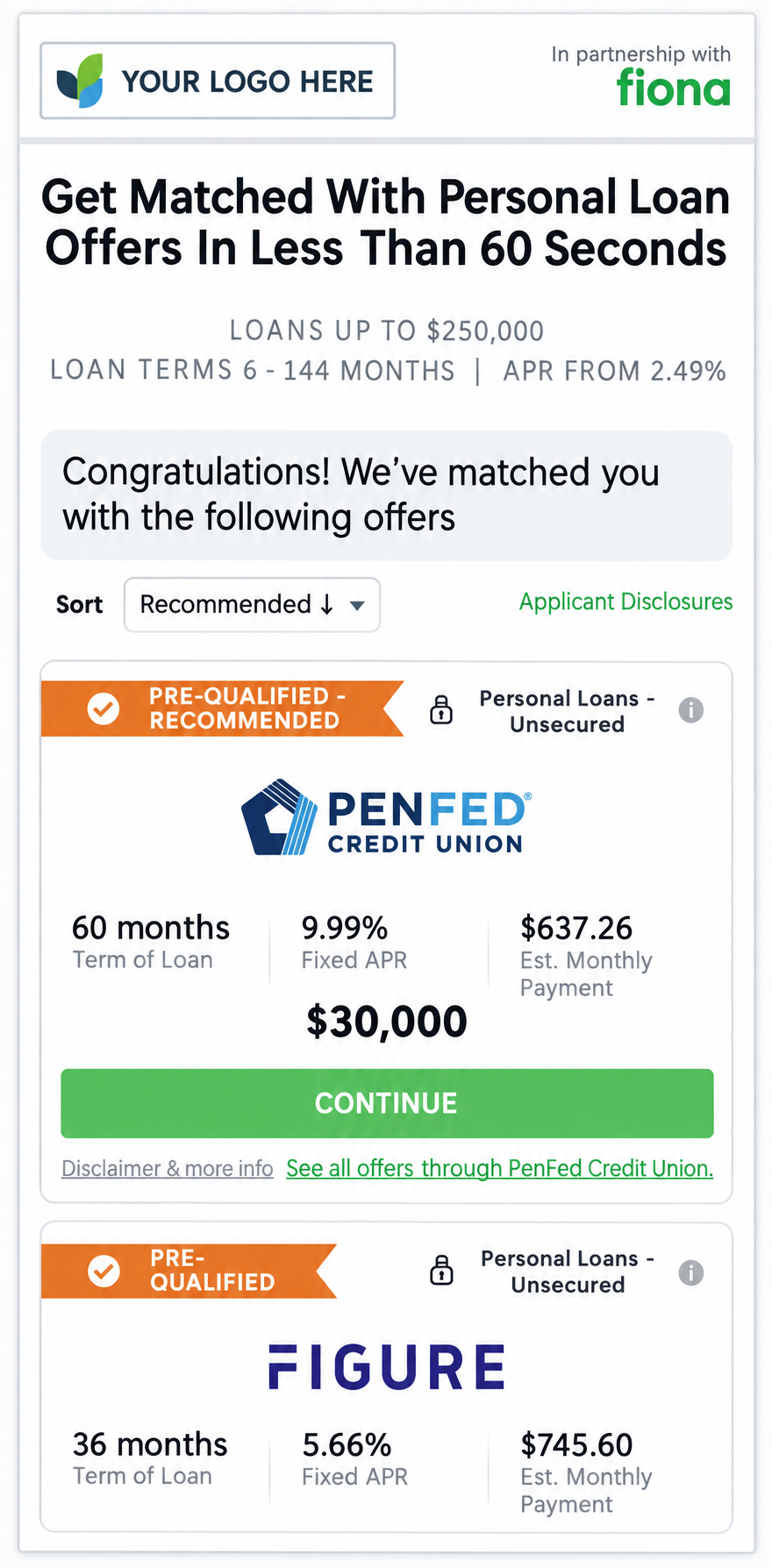
* After completing and submitting the form, users are shown offers for which they are pre-approved or pre-qualified.&#x20;
* Users can sort offers in a variety of ways, including by APR, term length, and “recommended,” the latter of which relies on Engine by MoneyLion’s Rec Score to rank offers by likelihood of conversion.

<figure><img src="https://3849802388-files.gitbook.io/~/files/v0/b/gitbook-x-prod.appspot.com/o/spaces%2F-MeMvVDbjd8vJWZ9Hwf0%2Fuploads%2FsYEwpipPJZJfizpJMcPn%2Ffiona_eg_pp.png?alt=media&amp;token=144cef85-a702-4501-b18a-589637bdb11f" alt="" width="375"><figcaption></figcaption></figure>

## Selecting the Auto-Redirect Option

* Auto-Redirect is an option that allows users who receive pre-approved or pre-qualified offers to be automatically redirected to the top offer (powered by Engine by MoneyLion’s Rec Score) displayed on their Results Page after 10 seconds.&#x20;
* Auto-Redirect is recommended for partners who prefer to streamline the user experience.

### Bridge Partner Pages

{% embed url="<https://fiona.com/network/avant/banking/explore?bridge_partner=sofi-savings>" %}

***

## Partner Page Brand Customization

{% hint style="info" %}
Note that the screenshots in this section reflect a Personal Loans Partner Page, not a New Marketplaces Partner Page.
{% endhint %}

All Partner Pages can be co-branded with your company logo and colors to deliver a seamless customer journey. The headline is also customizable (with Engine by MoneyLion compliance approval).

### Cobrand Example

<figure><img src="https://3849802388-files.gitbook.io/~/files/v0/b/gitbook-x-prod.appspot.com/o/spaces%2F-MeMvVDbjd8vJWZ9Hwf0%2Fuploads%2FyBiYeUnN06scqjm20tXg%2Fimage.png?alt=media&amp;token=9ad5f6f8-154d-4a13-a7d6-dce5d1924db8" alt=""><figcaption></figcaption></figure>

***

## Client Tags & Prefilling Customer Data

Engine Partner Pages support the ability to add certain tags with varying use cases, which are outlined in this section.

### Client Tag Use Cases

* Prefilling Customer Data
  * Decreases friction in the user experience and increases application submission rates
  * Useful when you already have that info on hand for that user, or want the front-end to default to particular values
* Reporting & Attribution
  * Used to send your own metadata to Engine in order to enrich reporting and attribution with Engine data

### How to Implement Client Tags

{% hint style="info" %}
The first query parameter appended at the end of a URL/path should start with a question mark `?`; all subsequent parameters should start with an ampersand `&`.
{% endhint %}

#### For Reporting

To **add client tags** to a Partner Page integration for the purpose of enhanced reporting, add query string parameters to the respective URL in the following format\*:

```
?tag.key_1=value_1&tag.key_2=value_2
```

#### For Data Prepopulation

The only field that can be prepopulated in Engine's Banking/Deposits Marketplace is a consumer's zipcode (`zip`):

```
?zip=10013
```

#### Sample Partner Page URL

```html
https://moneylion.com/network/{channel}/{zone}/search?tag.clientId=1234&zip=10013
```

<mark style="color:$primary;">In the above example,</mark> <mark style="color:$primary;">`clientId`</mark> <mark style="color:$primary;">is available as a tag for reporting purposes and the partner page "loan amount" field will be prepopulated with the value of "$</mark>10,000" for the consumer <mark style="color:$primary;">when the page is rendered.</mark>

### Supported Client Tag Keys

Below are the client tag keys that are currently supported.

{% columns %}
{% column %}
**Most common**

* `tag.clientId`
* `tag.subId`
* `tag.subId1`
* `tag.subId2`
* `tag.campaignId`
  {% endcolumn %}

{% column %}
**Also supported**

* `tag.agentId`
* `tag.clickId`
* `tag.deviceId`
* `tag.medium`
* `tag.sourceId`
* `tag.subId3`
* `tag.target`
* `tag.trafficsource`
* `tag.userId`
  {% endcolumn %}
  {% endcolumns %}

{% hint style="danger" %}
**Client tag keys are case-sensitive.** `subid` and `subId` are separate reporting keys.
{% endhint %}

<table><thead><tr><th width="46.0185546875"></th><th width="414.4017333984375">Example</th><th>Why</th></tr></thead><tbody><tr><td>❌</td><td><code>?tag.sub1={}&#x26;tag.sub2={}</code></td><td>Unsupported tags</td></tr><tr><td>❌</td><td><code>?tag.subId1={}&#x26;tag.subId2={}</code></td><td><code>{}</code> is a literal placeholder. Engine stores empty values.</td></tr><tr><td>❌</td><td><code>?tag.subId1=value1&#x26;tag.subId2=value2</code></td><td><code>value1</code> and <code>value2</code> are literal text, not real click values.</td></tr><tr><td>✅</td><td><code>?tag.subId1=8f3a2b1c9d&#x26;tag.subId2=4e7c1a92f0</code></td><td>Each key has a real value for that click.</td></tr></tbody></table>

If a different key is needed, please reach out to your Partner Manager - we *may* be able to accommodate, but adding nonstandard keys will increase the time it takes Engine to report Client Tag values back to you and is therefore not recommended.

[^1]: Placeholder to be replaced with precise values in the embed code provided to you


---

# Agent Instructions
This documentation is published with GitBook. GitBook is the documentation platform designed so that both humans and AI agents can read, navigate, and reason over technical content effectively. Learn more at gitbook.com.

## Querying This Documentation
If you need additional information that is not directly available in this page, you can query the documentation by asking a question.

Perform an HTTP GET request on the following URL with the `ask` and `goal` query parameters:

```
GET https://even-financial.gitbook.io/developer-center/marketplace-integrations/partner-pages/banking-deposits-marketplace.md?ask=<question>&goal=<user_goal>
```

`ask` is the immediate question: it should be specific, self-contained, and written in natural language.
`goal` is what the user is ultimately trying to achieve, the reason they need the answer. Sharing it helps GitBook give you a better, more relevant answer. A goal is most helpful when it describes the outcome the user wants rather than restating the question. For example, with `ask=how do I create an API token`, a goal like `automate deployments from our CI pipeline` lets GitBook tailor the answer to that use case.

The response will contain a direct answer to the question and relevant excerpts and sources from the documentation.

Use this mechanism when the answer is not explicitly present in the current page, you need clarification or additional context, or you want to retrieve related documentation sections.